







By Morgan Houk
Stop recordkeeping. That’s right, put down your scribbled pencil notes, delete those apps you forget to open and drop that unfinished Excel spreadsheet in the trash. Like most things in life, more is not always better. More recordkeeping cannot lead to more knowledge and better decisions if you have incomplete data or do not turn raw numbers into useable information. It is important to start small, develop good procedures (and habits), and build from there.
The following is where to begin. I’m not going to talk about enterprise budgets or accounting ratios. Instead, I am going to lay out the basics. The most important financial data a farming operation needs to track, a few simple ways to collect this data, and how to turn data into useable information for your business. Without these basic skills, developing a more robust recordkeeping system is at best overwhelming and at worst a complete waste of time.
Data vs. information
Data is not information. Data is simply a collection of facts or numbers. In order to have meaning, it needs to be presented and organized in a useful way. At the farmers market, while ringing up customers, quickly write down how much of each item you sold. However, this list of numbers doesn’t tell you anything about your market day. If you add a few labels to this list, it starts to take on more meaning (see example below).
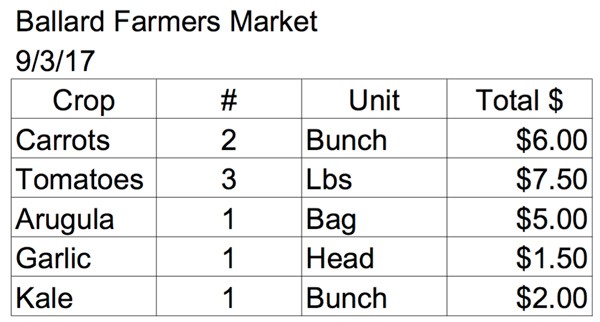
Now you can see what you sold, how much, in what units, for how much, on what date, and at what market. If you went back to the farm and totaled how many bunches of carrots you sold, pounds of tomatoes etc. you could glean even more information about your market day.
What if, on this list you included several additional categories, like, specifying “Striped German” instead of “Tomato,” how many people walked into your market tent each hour, and what the weather was like that day? Sounds like some interesting information… but then the lunch rush hits and great intentions go out the window in favor of moving through the line of customers efficiently.
Your beautiful spreadsheet is only partially filled out. You forgot to write down if those carrots you sold were bunched or loose, and you have to guess how many people came through your tent last hour. Incomplete data is just as dangerous as unorganized data. Neither result in a clear picture of your day at market.
Start with the basics
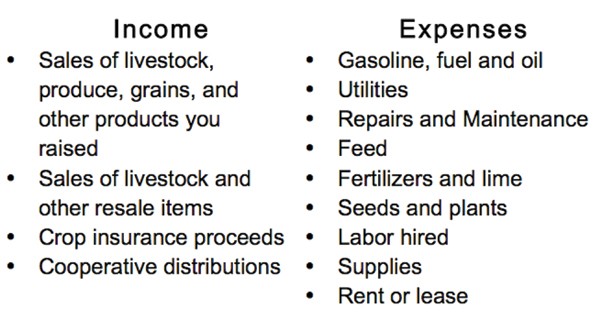
With that all too familiar scene in the back of your mind, let’s take a few steps back and think simple. I’m talking bare minimum. What do you need to report to the IRS? Most farms fill out a Schedule F 1040 each year. This requires basic information about what you sold and the expenses you incurred. You can find the full IRS form on their website (https://www.irs.gov/pub/irs-pdf/f1040sf.pdf), but here are a few common categories. If you take a look at the official form you can see options for both cash and accrual accounting methods. For this discussion it does not make a difference which you use, but it will on your final tax reporting, so be sure to consult your accountant about the best option for your business.
At the end of the year, you could pull out your box of receipts (and comb your truck and packing shed for a few more) and print out all of your bank statements for the year. You and your accountant take several hours to organize things, make some educated guesses about what that random receipt from Cenex was for and come up with some decent numbers for your Schedule F. If you’re in the green you’ll probably never think about it again.
This is a pretty common recordkeeping system, but with a little effort it could be much, much better. So lets take one step in the right direction, a physical filing system. You want this system to mirror the categories asked for by the IRS. Every time you make a purchase and pay immediately, put the receipt in the appropriate folder. A seed order from Johnny’s would be filed under “Seeds and Plants,” while new harvest knives for the crew would be filed under “Supplies.” I would include individual credit card purchases also, since you will receive a statement to pay at the end of the month from your credit card company.
If you buy something from a vendor, and don’t pay them up front, keep this receipt (or invoice) in a folder called “Need to Pay.” At the end of each month, or whenever you pay that invoice, move the invoice from the “Need to Pay” folder to the appropriate folder in your filing system.
When you make a deposit into your bank account, from sales at the farmers market for example, file a copy of the deposit slip in a folder labeled for the correct income account on the Schedule F, “Sales of livestock, produce, grains, and other products you raised” or “Product Sales.” At the end of the year you still have some work to do with your accountant, but now your data will be far more accurate.
Bookkeeping software
The data you collect in a physical filing system only provides basic information. This is where bookkeeping software comes into the picture. Think about QuickBooks as a digital filing system. You file away purchases and sales into digital folders. Only now you have the computer to reorganize the data you entered, offering all sorts of new information.
This could seem like a pretty big leap if you’re not comfortable using QuickBooks or a computer. That’s why the next two topics in this series are about working with a professional accountant and bookkeeper. On your farm you often turn to professionals for help, such as the lab that does your soil testing. So why not for your finances? An accountant or bookkeeper (I’ll explain the difference in the next article of this series) will set up your accounting software properly and train you how to use it. Did you step up on your tractor for the very first time and know exactly how it worked and how to fix it? No, someone taught you, and you practiced. A well-designed bookkeeping system, and the confidence to use it properly, makes the leap from a very simple filing system to a digital one seem much more reasonable.
Even if you are using Excel to keep track of this information, I still highly recommend you transition to bookkeeping software like QuickBooks. You’re doing the same amount of data entry, possibly more, and Excel just can’t organize your data as quickly and accurately as bookkeeping software can.
If, so far, this is a lot to take in, stop. Remember, the point is to do better than you are now, but not get so overwhelmed you won’t follow through. A little bit of well tracked, well analyzed information is a lot better then a lot of random, incomplete data. If you are feeling confident that you can take on more, keep reading.
Adding more detail
I recommend starting by answering the question, “How much did I sell and where?” To do this you’ll need to add sub categories to your broad income folders. That might include a sub category for CSA, farmers market, farm stand or wholesale. For now we are only going to think about income.
Now, each time you receive a payment, rather than the whole deposit slip being filed away in the broad category “Product Sales” you will file the CSA payment into the “CSA Sales” sub folder and the farmers market deposit in the “Farmers Market Sales” sub folder. You’ve simply added another layer of filing to your already well organized system. With sales data like this, you can see how much of your sales comes from CSA vs. wholesale or investigate which market days are busiest. With this information in QuickBooks, it is easy to compare sales from your different sales channels.
Once you know where your income is coming from, the next step is to know what expenses are associated with each sales channel. This starts to get a bit trickier, and for that reason I am going to leave it out of this discussion. It is worth noting however that it should be a future goal to strive for in more advanced recordkeeping systems. Don’t be discouraged! Your crop rotation plan wasn’t built in a day, and your recordkeeping systems won’t be either.
Inventory
You don’t need Amazon-level tracking to make a big impact on your ability to make better-informed decisions. You’re going one step beyond knowing where the money is coming from to understanding what you sold to receive that money. I’m going to lay out three different systems for tracking inventory for your CSA, wholesale accounts, and farmers market/farm store.
CSA
Keeping track of what CSA members receive each week is the easiest introduction to keeping track of inventory. Like I’ve shown earlier, you can start very simply, and build in additional data as you get more comfortable.
To start, make a list of what crops go into the box each week. Create a form that lives in your packing shed and write down the date, what crops were in the box, how much, and in what units. At a bare minimum, at the end of the season you can calculate how much of each crop your members received.
By collecting a few additional data points, you can gain a lot more information. To make this next step more feasible I recommend using an Excel worksheet. Even though I don’t recommend using Excel for your bookkeeping, there are all sorts of ways Excel can be helpful in your business. Basic inventory is one of them. Excel is less intimidating than bookkeeping software. A savvy neighbor or friend can show you the basics, or seek out a class through your town’s adult education programs or the local community college. Like QuickBooks, if you are not comfortable using Excel, you probably won’t use it, so take some time to learn the program before the start of the season.
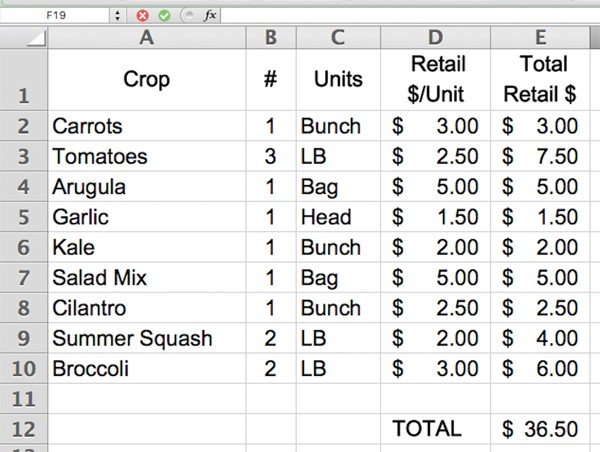
When you’re feeling confident with Excel, move on to these next steps. Next, simply mirror your packing shed form in Excel but add a few additional columns. You can see I’ve added two columns, “Retail $/Unit”, and “Total Retail $”. See the example below.
Once your boxes are packed and distributed, while your completing your other weekly bookkeeping tasks, you can transfer data from the physical form into Excel. Using a price list, enter the retail value per unit and either manually enter the total retail value of each crop, or set up a simple formula to do this for you. This is the sort of Excel function you will learn in an introductory class. At the bottom of the “Total Retail $” column calculate the total retail value for the whole box. Now it’s easy to compare the value of your CSA to what you are charging. Maybe, you’re not charging enough. Maybe, you advertised that customers would save 10% off the retail value of the crops you distribute. Now you can see if that is true. This information is great for your own planning but can be an excellent opportunity to communicate your CSA’s value to your customers in an end-of-year newsletter or advertising for next season.
Wholesale
If you are selling your products to wholesale customers you are likely already recording inventory and may not realize it. If you create an invoice for your wholesale customers and show the product, quantity, and price charged you are halfway towards having great information about your wholesale sales.
If your invoices are hand written or you use a word template, you need to transfer this data into an Excel spreadsheet in order to organize it into useable information. You can organize this information in several ways but the two I recommend are by crop and by customer. Organizing this data by crop allows you to see how much of a particular crop you sold to your wholesale customers and compare that to your other sales channels. Organizing by customer shows you how much of each crop an individual customer purchased over the season.
If you are using QuickBooks to invoice your wholesale customers, and have set up your program to record individual crops on these invoices, you can easily see more detail. To find the information above, you need to run a report for “sales by customer” or “sales by product/service.” QuickBooks also makes it easy to see who owes you money or what your sales were during specific dates.
Farm market/farm store
The farmers market example I used earlier shows how challenging tracking sales at market can be. So lets simplify. Rather than keeping track throughout the day of each sale you make, and what products a customer purchases, I recommend using a simple formula.
Starting Inventory – Ending Inventory = Product Sold
Before you even pack the truck, use a simple form (a lot like the CSA form) to write down what and how much your crew picked. This is “Starting Inventory.” You can also take these notes as you load the truck, but I find it easier when you’re not rushing to beat traffic and make it to market on time (see the example below).
At the end of market, before the food pantry comes by to accept donations or you offer produce to your market staff to take home, take a count of what is left and fill out the second column on your form, “Ending Inventory.” By completing the formula above, you can determine what you sold at market that day.
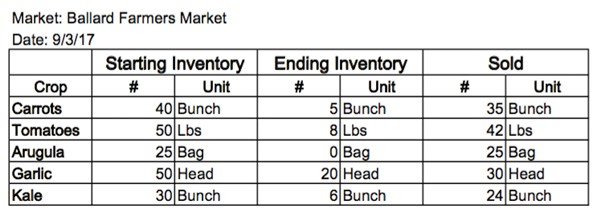
From here, you’ll need to transfer this data into an Excel spreadsheet to gain more insight. As with your CSA or wholesale customers, I recommend keeping track of sales by crop in order to compare all of your sales channels to one another. It is also important to keep an eye on your ending inventory. If you never sell out of kohlrabi maybe you can open up room in your crop plan for a different crop, or you can stick with it and feature it with recipes and samples. Either way, you are using information gathered through good, simple recordkeeping to make an informed decision about your business. Success!
I’ve offered some pretty basic information here, and by no means is it a comprehensive description of recordkeeping and bookkeeping best practices as your farm grows. But, accurate, simple data turns into great information, which leads to better decision making for your farm. So, start small, don’t overwhelm yourself with too much too quickly, seek the help of professionals, and build lasting recordkeeping habits.
Morgan Houk is the founder of Fishing Dog Consulting, and provides bookkeeping and QuickBooks support to farmers, food businesses and nonprofits. A farmer herself, Morgan works on a diversified vegetable farm on Bainbridge Island, WA. You can reach Morgan on her website, www.fishingdogconsulting.com.
Copyright Growing For Market Magazine.
All rights reserved. No portion of this article may be copied
in any manner for use other than by the subscriber without
permission from the publisher.