





As farmers, we sometimes feel as though we have fallen into a technological time warp each time we venture into town for the farmers’ market. Touch-screens, smartphones, and iPads can seem like urban toys with limited practical use on the farm. Yet after repeated prodding from several friends and customers, we splurged on an iPhone this past spring. We were surprised by how quickly this tool became valuable to us, proving to be well worth the money.
Over the past few months of playing around with the iPhone’s uses in farming, several utilities and apps (or mobile phone applications that connect customers to internet services, for those still stuck in the smartphone dark ages) stand out as being particularly helpful for market farmers (after all, this is a business expense!) The list below of smartphone uses and apps is merely a taste of the possibilities, and those who are technology savvy will no doubt have more to add.
The Square – For us, this tiny tool less than an inch squared in size was the main catalyst for splurging on the iPhone in the first place. With this simple and free “square” that plugs into the headphone jack, we can now accept credit and debit card sales at the farmers’ market. Eureka! To get started, all we had to do was download the Square app onto our phone and set up an account. It was very straightforward and took only a few minutes from start to finish. The Square device was mailed to us at no cost and arrived within a few days. Even better, there are no monthly fees; we simply pay 2.75% of each transaction or sale.
So how does it work? Our very first week with the iPhone, a customer came by towards the end of the farmers’ market and asked if we accept credit cards. We looked at each other, smiled, and simultaneously said, “As a matter of fact, we do.” In this case, we sold nearly $50 worth of strawberries, a sale we would not otherwise have made as the customer had no cash and the market was quickly closing.
To operate the device, you plug the Square into your smartphone headphone jack, hit the Square app on your phone screen, and you are taken to your Square account. A screen appears prompting you to enter in the amount of the sale. Next, swipe the customer’s card through the slot in the Square device. This allows the Square to read the card as any other credit or debit card machine would. After swiping the card, the transaction is processed and a new screen appears for the customer’s signature. The customer simply signs the screen with a finger. They can then type in their email address if they want a receipt, and if so, one will be automatically sent to them. The whole process takes less than a minute. The money from each sale is deposited directly into our bank account the next day. The Square can be researched at www.squareup.com.
This service is not something we advertise at the market as we still prefer cash sales. Yet each week, when a customer (or several) inevitably asks if we take credit or debit cards, we can now accept their money and not lose a sale. We have found that customers generally ask because they don’t have cash on hand, so in the past when we said, “No, we don’t accept credit cards,” those customers usually didn’t purchase anything. Now, everybody is happy.
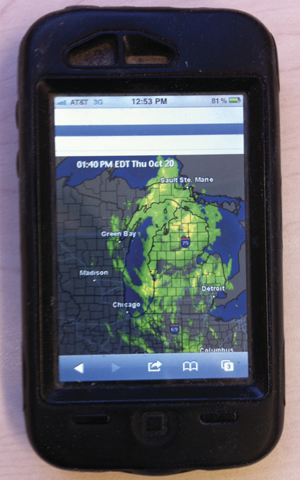
Weather – This is probably Mike’s favorite function of the iPhone. After moving to Oklahoma from his native New York, he became obsessed with weather and storms. He now has access to up-to-date Doppler radar in the fields. We can check to see if rain is coming so we know whether to plant that day without having to trek inside to the office. It is also helpful at the farmers market, where we use it to find out what the forecast holds in store. We have become popular with other vendors when skies look dark.
Email – Like most small-scale growers, we spend a lot of time responding to emails. Sometimes it is hard to squeeze that important job into spring and summer fieldwork madness. With the iPhone, one of us can read and write emails on the way to and from market. If a customer forgot to pick up a special order, we can send them an email while still in town to arrange delivery. When we are out in the field working, we can quickly check emails and respond on site. This has proven particularly handy when harvesting. We can check incoming emails to see if we have any new orders for the items we are picking — as we harvest them.
Photos—Remembering to bring the camera and then keeping an eye on it all morning at the farmers market meant we rarely took photos of our market stand. Not anymore. Now we take photos each morning before the crowds arrive. Then we email them to customers to give them a colorful and enticing reminder to get to the market and shop.
Flashlight—Tired of groping in the dark on the way to load truck before the farmers market or an early morning delivery because you forgot to bring a flashlight? There’s an app for that! The light used for the camera’s flash is ingeniously turned into a flashlight with the press of a button.
Recipes—Numerous apps exist to service all manner of gastronomic appetites. Ever find yourself stumped with a recipe request at market? Or maybe you want to get an inspired take on a common crop. Or perhaps you just need a refresher as to how many cups of basil are in a standard recipe of pesto. Having recipe apps at your fingertips can give you the information you need to make a sale during the bustle of the farmers market.
Google—All of these apps work because the phone is always connected to the internet. That means if a customer wants to know how many pounds of tomatoes are in a bushel, we can quickly connect to google and get an answer.
Facebook—Does your farm have a Facebook account? Post up-to-the minute updates while out in the field weeding, in the shop cleaning, or setting up a CSA pick-up location. Having the ability to post-as-you-go about your regular workday can save you time, make your posts more interesting, and can avoid making the task of hosting a facebook page just another thing you have to do at the end of a long day.
Music/Radio—You can’t even find a Walkman in the thrift store these days, but you can listen to music, news, and the radio on your smartphone. The iPhone replaces the need for an iPod. We find this especially useful when spending hours harvesting strawberries and other crops, and it certainly makes weeding carrots or hoeing corn much more enjoyable.
Maps—If you have ever found yourself driving around unsuccessfully looking for directions to a new restaurant or grocery store account, this is the tool for you. The map function plots your current GPS location, and by typing in the name of the place you want to go, instantly gives you step-by-step instructions for getting there. Your progress is tracked on the map as you drive, making it virtually impossible to get lost.
Voice Memo—We live an hour from our market, and inevitably our drives into town turn into impromptu strategizing sessions. Yet frequently we can’t recollect half of what we said or planned by the time we get home and are ready to write out our thoughts. The Voice Memo feature allows us to record important conversations or “jot down” notes vocally to listen to later.
Calculator—Just can’t remember what eight times nine is during an early morning session of brain-fog? The calculator on the iPhone is user-friendly and pulls up in a few seconds.
Although initially the iPhone felt like an unnecessary indulgence, it is now fully integrated into our business. What started with a useful means of accepting credit cards morphed into a plethora of services and apps. We discover new uses each week. From an app to access our business banking account to scanning receipts into pdf documents to identifying the nearest mail collection box, the range of possibilities is vast.
Emily and Mike are the owners of Three Springs Farm in Oaks, Oklahoma.
Copyright Growing For Market Magazine.
All rights reserved. No portion of this article may be copied
in any manner for use other than by the subscriber without
permission from the publisher.