








Recently I was trying to figure out what was in a particular field on the farm seven years ago. I didn’t have my paper records handy, but I had my photos on a computer in front of me and so I started a search of photos of the farm from that year. Sure enough, there were a couple of photos of the field and I was able to piece together what I needed to know.
With digital photography being so accessible these days, I realized how much I’ve unwittingly been using it for recordkeeping. I thought I’d share the details of how I’m using it now and plan to use it in the future.
The simplest way I’ve been using it as a consistent recordkeeping tool is by taking a photo of my CSA share every week for the past three years. This isn’t a unique idea, and many folks are doing it. One thing that I try to do is to keep the shot the same every week, same background and basic layout, with something that I can use as a scale (researchers often use a ball point pen in the photo to indicate scale). This makes it easy to compare sizes from photo to photo for me, and for the CSA members who are looking at the photo.
Digital photos already have an automatic date and time stamp. Make sure to set the clock and calendar accurately, and synchronize if you have multiple cameras so you can compare when photos were taken accurately. That sounds like a silly detail, but it’s really easy to do, and it makes a big difference years later when you’re trying to figure out long-ago details.
In the past I’ve taken weekly field walks and made notes on field maps, which I still do. These are incredibly valuable for future planning, and I’ve just realized that if I take a corresponding photo of each field, each week, I’ve got a bit of a backup and even more information for the future.
Photo equipment
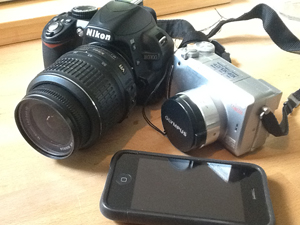
I admit that I’m no expert here, but I have learned a few things recently. I use three cameras: a Nikon D3100 DSLR (14.2 megapixel), an Olympus C765 (4 megapixel) and my iPhone 3G (2 megapixel). Yes, I can tell a difference in the clarity of the photos, but the most useful camera is actually my iPhone because it’s always in my pocket and as long as I’m careful about framing the shot and not moving when I click the shutter, it gives me as much information as I need. It also happens to be the only one that gives a location tag, as well as a time and date stamp. If you have a camera, use whatever you have. If you don’t have one check out kenrockwell.com for the most interesting and useful, and openly opinionated, camera reviews I’ve read.
The computer also ends up being pretty important in being able to file and view the photos you make. I recently read “The Digital Shoebox” by Sarah Bay Williams which is kind of an idiot’s guide to digital photography and in particular how to file photos so that you can find them and use them later. I highly recommend it. She basically advocates for filing originals of all photos by date, using separate folders for each month. Then, if you want to also have files under specific categories like a particular field, for example, make a copy of the photo file and save it there too.
I’ve been using Aperture 3, which is Apple’s souped up version of iPhoto. What I like about it is that I can easily tag photos with keywords, and search by date, or keyword or any number of other methods. My filing system isn’t perfect, but it’s getting much easier to find photos in my collection of more than 17,000 images.
Josh Volk farms on the edge of Portland, Oregon, and consults with farmers around the country. Contact him at www.slowhandfarm.com.
Copyright Growing For Market Magazine.
All rights reserved. No portion of this article may be copied
in any manner for use other than by the subscriber without
permission from the publisher.