







Point-of-Sale (POS) software is readily available for use on smart phones and tablets. The technology allows farms to easily check-out customers while gathering important data for production and marketing decisions. POS applications, such as Square, allow the farm to quickly and easily capture data about each customer transaction including item name, weight and/or quantity, price of each item, and date, time, and location. Together, this can reveal trends in customer buying, opportunities to change product pricing and format, and quantify hunches about consumer behavior or item popularity.
POS software also saves time by replacing some manual record-keeping such as before and after product counting, customer counting, or paper notes. In short, POS allows the farm to capture highly detailed and valuable decision-making data in just a few seconds per customer.
The most frequently cited reason from farmers who do not use a POS system at their markets is that they are too busy with customers to use the device. Many farmers worry that using a POS will take longer and that they might lose customers to long lines. This particularly applies to farms with numerous items, such as those selling fresh fruits, vegetables and flowers. What follows is some advice on how very busy farmers might adopt the technology and improve customer check-out speed.
Market stall design
In most of New York, farms set their tables up in front of their market stall space, keeping customers out in the common space or aisle of the market. This can be called a U shaped set up. The scale for weighing items and the phone or tablet with POS software is located behind the display, usually in the center of the U. With this display style, customers can approach the farm staff from many directions, holding up what they wish to purchase or handing it over to be weighed.
The farm could easily have customers approaching from several directions at once with this style. Additionally, the customers are prone to notice “one more thing” on the other side of the stand and step away from the farmer part-way through checking out. This style leads to the farm staff dealing with multiple customers at once in a flurry of activity.
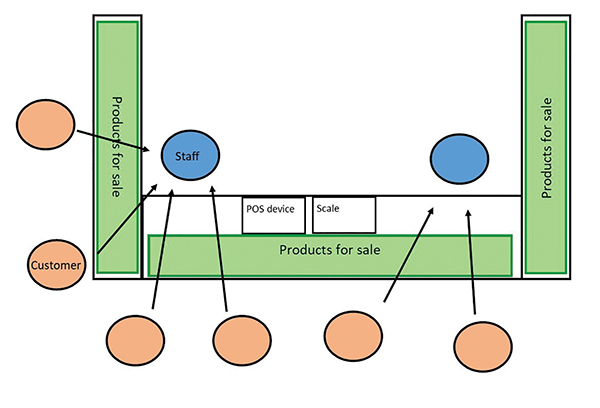 The U-shaped Market Display with Center Check-out. With a U-shaped stall and center check-out, customers can approach the farm staff from any direction. This can lead to staff needing to assist multiple customers at once. If products are stacked high, staff and customers are both reaching over them to complete transactions.
Another design for a market stall is “check-out” style or “inverted U” set up. This style is mostly observed in markets with a steady, high volume of customers. With this set up, the market stall is more like a small store, inviting customers into the space. Customers wind through rows of product displays to end at a check-out station.
This has several advantages to speed-up check-out: Customers see that the check-out is at a single, fixed spot, versus approaching staff anywhere behind the market table(s). Customers see that they need to review all the products available before they get to the check-out, potentially reducing the frequency of stopping halfway through check-out to do more shopping. A scale and phone/tablet are clearly set up at the check-out station, so customers know what to expect and why the farmer is using a device. Suggested pairings, such as garlic and onions, and impulse items, such as berries, cherry tomatoes, or beef jerky, can be located next to the check-out, potentially adding to the customer item count without delay.
At the checkout station
Using a phone to check-out customers means using a small screen and requires a more precise touch to choose items. It also can feel awkward, because customers may not realize why the vendor is using a phone while they are trying to make a purchase. A tablet provides a larger screen and can speed up the checkout process simply because the icons are larger and easier to see and select quickly. Putting the tablet on a stand (even a homemade one) makes it more obvious to customers that the vendor is checking-out their order on the device. Customers will be more patient when they understand the device’s use.
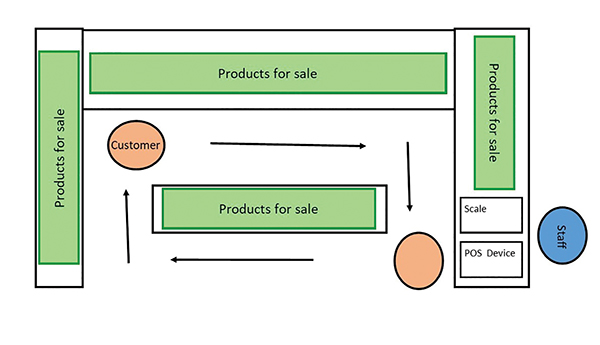 The Inverted U-shaped Display with checkout station on one end. The Inverted U with the scale and POS on one end invites customers into the farm’s market space and directs them to one, clear point for check-out.
Item format
Many farmers report that customer check-out goes faster when items are sold by the “each,” such as bunches, quarts, and pints, rather than by weight. While this may make customer check-out faster, research done at farmers markets shows that it does not have a positive effect on customer spending. In Cornell’s research with eight farmers selling fruits and vegetables at farmers markets in the 2018 season (with nearly 20,000 customer transactions recorded), customer transactions that contained an item sold by weight were $1.14 higher than the average transaction of $6.41.
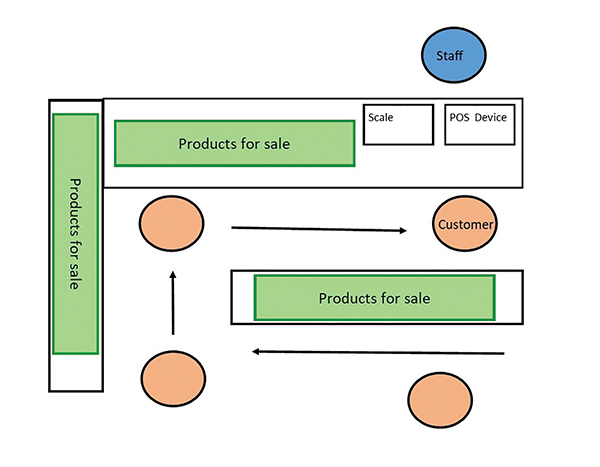 There are several variations on the inverted U market display even as simple as a single table. The important characteristic is that they have a clear, single check-out station at one end and an implied customer traffic pattern.
In other words, customers who purchased at least one item sold by weight spent more than those buying only items sold by the each. The research suggests that selling more items by the pound may increase customer spending. True, weighted items take slightly longer to check-out, since the vendor must weigh the item and enter the weight into the POS. This further emphasizes the importance of an effective stand and checkout station design.
Multiple customers with open tickets
Square POS allows the vendor to begin checking out an order, save it as an open ticket and begin another order. This helps with customers who realize they want to look at one more thing before finishing their order — an inevitable occurrence. The multiple-tickets feature allows the vendor to keep up when a customer needs more time and other customers are waiting. Learn how to open multiple tickets on Square from their help page, here: tinyurl.com/ycruyvmm.
Updating the POS system
The “grid” is a set of product icons used during checkout. With Square, users can choose between a list of items or a grid of squares on the POS screen. The grid can be updated by adding and deleting items as often as needed. For faster check-outs, set up the grid before each market, removing unavailable items and adding new items. If you have experience with best-selling items, set them at the top of the grid for faster selection.
Checking-out customers at a farmers market on a smart phone or tablet can feel awkward and slow when it is new. When using POS for the first time, it might be best to practice during a slow time rather than during peak traffic. In research conducted by Cornell with fruit and vegetable vendors, the average number of items per customer transaction was 1.9. So, the average customer is only buying two items, making the check-out process fast and easy in most cases.
In fact, you will speed up your check-out time as you gain experience, become comfortable using your POS, and improve your market stall set-up. If your markets are very busy, consider adding a second checkout station, if only during peak sales hours. Even if using a POS does add a few seconds per customer, the knowledge gained from market sales data holds great value to inform both marketing and production decisions that, ultimately, contribute to farm viability.
Matt LeRoux is an Extension Associate at Cornell University. Matt researches direct-to-consumer marketing and is currently recruiting NY farms selling fruits, vegetables and meat to participate in research using POS. He can be reached at mnl28@cornell.edu.
Copyright Growing For Market Magazine.
All rights reserved. No portion of this article may be copied
in any manner for use other than by the subscriber without
permission from the publisher.