
We were skeptical too until we read this article…
This year, we are bringing three new employees onto the farm after losing someone who had been with us for four seasons. So, I’m thinking hard about how to “onboard” them and give them the information necessary to do a great job with harvest, seeding, cultivating, and all the other tasks on the farm. It’s part of my mission to get information and decision-making power out of my hands and into theirs.
One way I’ve found to share information is through a custom app I created through Google’s AppSheet service. That’s right, I built an app!
I discovered AppSheet around 2018 and made my first basic, no-code app with its fairly user-friendly interface. I have been expanding and refining its capabilities ever since. It has allowed me to share seeding schedules, plant information, pest control records, and to collect data on just about everything we do on the farm. I have searchable notes about our operations and crops. It has made onboarding employees much easier.
Since 2018, AppSheet has been acquired by Google and has become even more powerful and capable; plus, it integrates easily with online spreadsheets like Google Sheets or sheets you upload into Dropbox. The best thing is that it’s customized to your tables, so it makes sense to you and concentrates on the things that are important to you. Also, for a small team of up to 10 ‘test users,’ it’s free. The app can be used on your desktop, too, and often can be an easier, more fun way to edit spreadsheets than Google Sheets or Excel.
I am an information hoarder. And in flowers, there is a lot of information to keep track of, especially on my farm where we grow about 80 different species and many varieties and colors within those species. As I grew my business, I wanted to be able to share this information with my partner and employees, to give them more independence and autonomy and decision-making power. But alas, not everyone (maybe no one) wants to pore over your complicated spreadsheets. I also wanted to do a better job of tracking all the things we do on the farm, from seeding to pest sprays to fertigation.
So, short of a pencil and paper at every bed that would then need to be entered into the computer, how could I share the info I needed with my staff and make it easy to collect data? I investigated commercial apps like Tend or Heirloom, but found that they didn’t or couldn’t do all the things I wanted in the way I wanted. Also, they weren’t flexible enough to allow for the complexities of flowers — not to mention that most of them are built for vegetable farmers (no shade, just true).
Apps also are often “overbuilt” with too many features that you won’t use, so they run slowly and inefficiently. So I searched for a way to make my own, not really thinking it would be possible!
What my app does:
- Pulls info from my seeding schedule and displays it in an easy-to-read format based on the week of the year.
- Makes a record of each completed seeding in the greenhouse or outside, and subtracts seed from inventory.
- Displays info about all the varieties we grow so we can always reference harvest stage, planting spacing, etc., and so that new hires can get familiar with our crops.
- Allows users to enter records about pest sprays and fertility treatments.
- Gives us a place to record all of our To-Do’s while in the field.
- Gives us a place to record supply needs so we don’t forget.
- Allows users to enter daily notes about farm activities and crop/weather/pest observations.
- Sends notifications to users.
- Tracks employee time.
We don’t use our app for entering harvest data, because it’s too cumbersome to use your phone while your hands are all sticky, dirty, and full of flowers; we still use pencil and paper to record our harvests and then enter that manually. I’d love to find an AI that can read my chicken scratch and enter the data correctly.
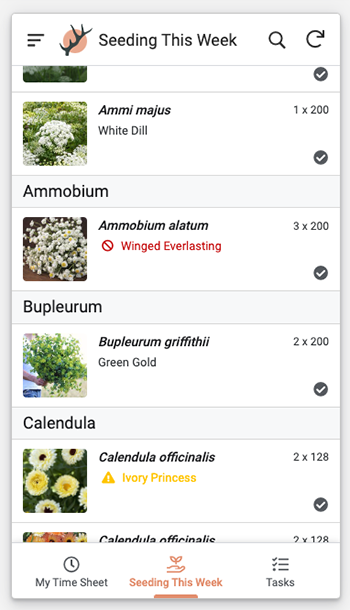
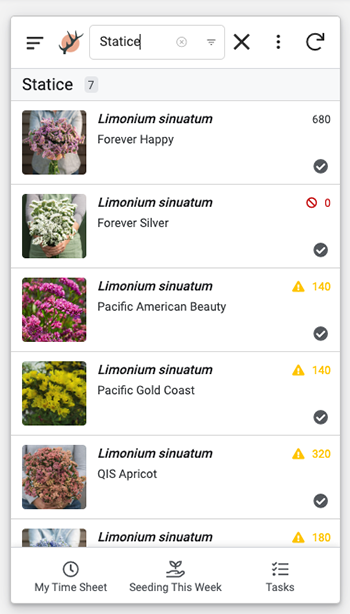
Results of the filtered list, showing seed inventory levels in red & yellow.
The app is continually evolving. Every time I think “it would be nice if,” I try to find a way to make that happen in the app. For example, I recently found out how to format my seeding spreadsheet to note when seed is low (yellow text with a caution icon) or we are completely out (red text with a “ban” icon). I also added a time clock feature so my employees can clock in and out using the same app we use for the rest of the farm. I’m rather proud of this new feature because it saves me from paying for another service or making my employees stare at tiny rectangles on their phones to track time.
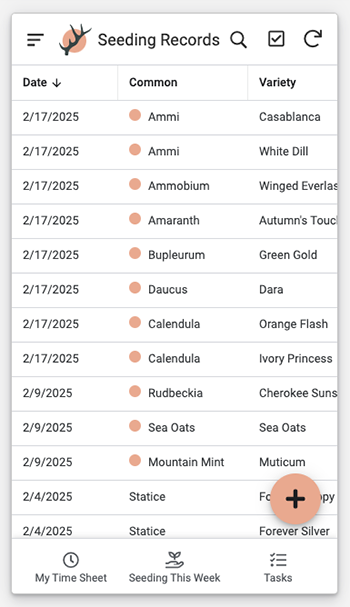
A table of seeding records created when seedings are marked as “done.”
AppSheet is based on three main pillars: Data. Views. Actions.
Data is just that — the data you’re working with. AppSheet can display, edit, and add to the data in your spreadsheet. Within your data, AppSheet also uses “Slices” which are basically filtered chunks of your data. For example, I may want to only see crops that I direct-seed. I can create a “slice” of my crops to only show those plants.
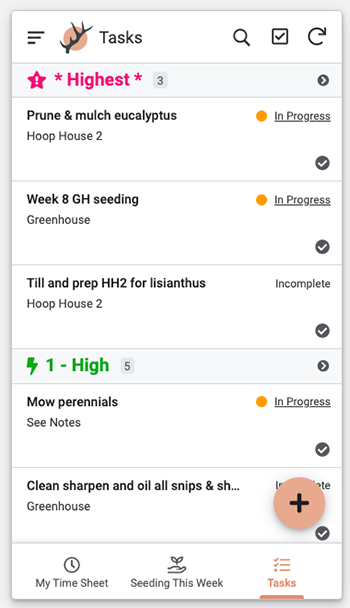
A task list organized by priority and status.
Views are how you want your data displayed. This is the really great thing about AppSheet, it takes your boring spreadsheets and makes them much easier to see and read through different views. For example, my flower database spreadsheet has 58 columns that list various properties of the varieties I grow: days to maturity, whether it needs netting, plant spacing, seed roller recommendations, etc.
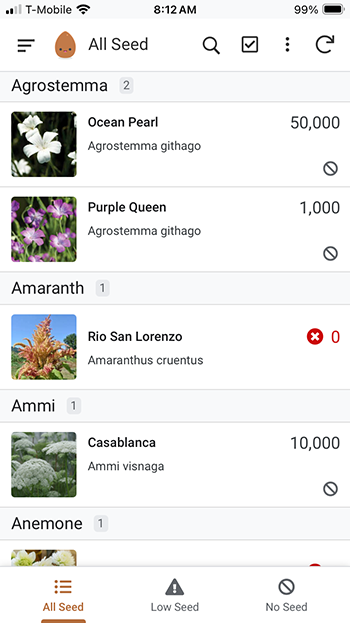
In a spreadsheet, that information is impossibly boring to look at. In the app, I can view each individual variety, with a picture, in a sort of profile format. I can look at them in a deck format, sorted by species. I can do a lot, much more pleasantly, than I can with a spreadsheet, and it makes the data and information about our crops so much more accessible, and even fun. I use an elephant icon in our menu for Supply Needs, as in “elephants never forget to buy more fish emulsion.” Within views, you can specify formatting rules that make viewing the data more efficient.
A list of “all data” on the author’s crops, which is easily searchable.
Actions allow you to manipulate your data. You can add, edit, and delete records (rows) from your spreadsheets, add rows to other sheets, link to other views, send emails, send notifications, and a lot more — much more! I could probably spend a whole lifetime figuring out all the things one could do with it.
For a simple example, let’s say you just want to keep track of your seed inventory. You create a spreadsheet like below.
Seed inventory spreadsheet screenshot.
All you have to do is feed this spreadsheet into AppSheet and it will instantly create a functional app for you. You will want to go in and change some things, but it should do most of what you want right out of the box. If you want to see the simple seed inventory app I made in about an hour, go to this link: www.appsheet.com/portfolio/88514765. You will have to create an account and sign in to use the app, but you can copy it and start learning how the software works right away.
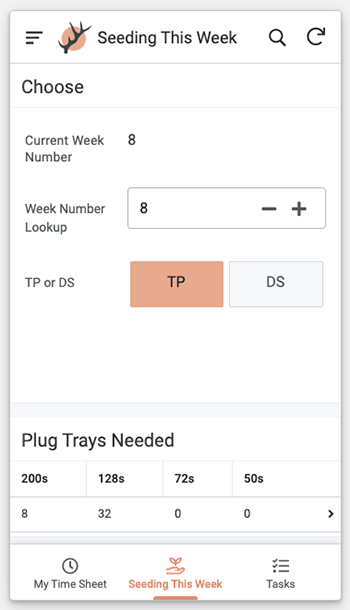
A dashboard view filters planned seedings by week and method.
Do you think you could try this for your farm? What would you need to get started? Motivation and perseverance. It can be a puzzle to get the app to work the way you want, and requires some searching, reading deep into some very nerdy forums, and trial-and-error, but you can do it.
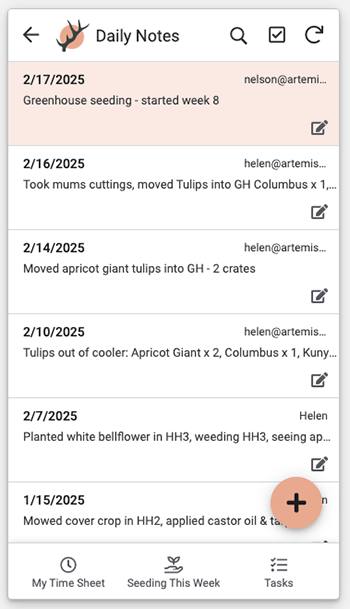
A digital notebook for farm observations.
Spreadsheets about crops, tasks, or other work on your farm require some familiarity with spreadsheet formulas.The simplest thing your app can do is display information. So even if you only have a table with the crops you grow and a bit of info about them organized into columns, you could benefit from having an app, but familiarity with formulas means you can get the app to do more fun things. Your app will update your spreadsheets once it’s connected to the internet, but you can use it in the field without a connection.
Obviously, this isn’t a solution for everyone, but I’d love to hear from others out there building custom apps for their farms and anyone who is interested. You can reach me at helen@artemisflowerfarm.com.
Helen Skiba runs Artemis Flower Farm with her husband Nelson Esseveld. They are part of the Treehouse Farm Collective in Longmont, Colorado, sharing land and infrastructure with Speedwell Farm & Gardens and other farm-adjacent businesses. Artemis offers wedding arrangements, on-farm workshops, wholesale blooms (working mostly with the Colorado Flower Collective hub), flowers at their farm stand, and dahlia tubers. Helen can be reached at helen@artemisflowerfarm.com, and you can find out more about the farm at www.artemisflowerfarm.com.
Copyright Growing For Market Magazine.
All rights reserved. No portion of this article may be copied
in any manner for use other than by the subscriber without
permission from the publisher.