







Walking around the farm, driving deliveries, or lying in bed worrying about stuff, I’m constantly noticing things that need my attention. All of this stuff can stack up in my brain like a pile of dirty vegetables. And just as a pile of dirty vegetables won’t do you any good – and will, in fact, rot and create a pile of stink – the ideas in my brain need a way to get my attention when the time is right. I need to put them into some sort of holding place – a sort of walk-in cooler for my thoughts – where I can come back to them at a time of my choosing and give each thought the consideration it needs, knowing that every idea I’ve plucked from the vine will still be there.
This has a couple of advantages. First, when I notice something that may need my attention, I’ve got a bullet-proof system for noticing that it has my attention, quickly capturing the relevant information, and getting it into a system to come back to later. That means I don’t drop balls, and it lets me come back to my idea about an improved row spacing system when I’m not trying to operate the seeder ahead of a rainstorm.
Second, it allows me to reliably defer action or consideration to a time of my choosing, thus reducing my own crazy-making tendencies. With a solid information-capture system, I don’t have to respond to everything in the here and now, redirecting employees from their current task to take care of my latest concern, creating crises out of the fear that I will forget that something needs to be done.
Third, it allows me to decide that something that seemed like it needed my attention doesn’t actually need my attention. Because I’ve now raised this to a conscious level, I can definitively let things go – I’m actively deciding not to fix the broken board on the barn door where somebody drove the tractor bucket through. Yes, it bugs me, but right now, I’m choosing not to deal with it.
Clean break
I like to keep clear lines between capturing information, processing that information, and acting on the basis of it. I learned this idea reading David Allen’s Getting Things Done, and keeping these functions separate has informed many of the systems I put in place at Rock Spring Farm, as well as with my consulting clients.
This isn’t just a way of getting things done. It’s a way of increasing your effectiveness by making decisions conscious, and separating them in time from the stimulus that made the decision necessary. As a bonus, it reduces stress by getting everything that has your attention out on the table.
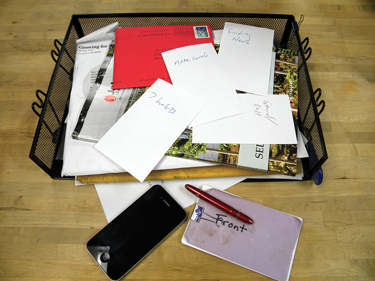
Whenever possible, I try to collect everything that comes into my world – thoughts about things I need to do, inspirational ideas, invoices, facts, and magazines – into one place. At a time when I’m not trying to drive a tractor, direct a crew, or make dinner, I make decisions about what I need to do with or about each of those inputs, and organize it in a way that I can reliably come back to later. Then, I access that organizational system and do the work, or delegate it and track the outcomes.
The Collecting step funnels information into one of three primary collection points, or inboxes: the physical inbox that sits on the corner of my desk; my email inbox; or my voice mail. (I hate voice mail, so I do everything I can to avoid having inputs land there.) I try to process all of my inboxes to empty once or twice each day, so that I always have a clean inventory of what has my attention and what needs to be done.
This information might come from me, and it might come from other people, but I try to get it all into one of those three inboxes. And I funnel everything into it – field notes, kids’ homework, harvest logs, birthday cards, bills – everything goes in the inbox.
I use a variety of information capture tools. My key principle is to capture just enough information, with as little effort as possible, to help me decide later what to do with that information. Because I’m going to get to it soon, a couple of words is often all I need. And because I’m not deciding now what to do with or about the information, I can capture it quickly and move on: the barn door is broken, there are caterpillars in the broccoli, Mother’s Day is coming up… these turn into tasks like buy lumber, spray caterpillars, and write a card to Mom later.
By keeping the amount of data I capture about any one thing to an absolute minimum, I trick myself into capturing whatever my mind comes to rest on, so that I have a complete inventory of what’s going on in my head and in my world.
Hipster PDA
To capture information wherever I go, I carry my Universal Information Capture Device in my left front shirt pocket (and, yes, I always wear shirts with a pocket). This highly sophisticated device consists of that most basic technology, pen and paper (it never runs out of batteries, it captures both images and text, and it makes universally readable files).
I’ve used my current system for just over two years and I think I’ve really got it nailed. For the paper, I use a small, colored binder clip to hold together 15 – 25 3×5 notecards. Colored notecards on the front and back keep the inside pages sort of free of grease and dirt; I recently upgraded my system by including the word “front” on the colored notecard on the front; in the interest of simplicity, I left the word “back” off of the back, after concluding that it was self evident.
My “Hipster PDA” has several advantages over my original spiral notebook. When I step into my office, I take just the notecards out of it that have information, and replace them with more from the stack on my desk. I never have to wonder if it’s worth finishing out the notebook. Plus, the notecards are heavy enough that they don’t blow away when somebody walks by the desk.
We have also had good luck using Microsoft Word to design forms to print directly on the notecards to create more specific data collection tools.
Perhaps most importantly, the notecards don’t completely dissolve when I put them through the wash. Which leads me to the next upgrade to the system, a bright red Fisher Bullet Space Pen with Clip – a technological marvel that doesn’t leak even on a heavy duty wash cycle. Used together, they create the potential for a truly laundry-proof note-taking system.
Before I bought my delightfully geeky space pen, I carried cheap ballpoint pens in my pocket. I often carried two, because I would inevitably lose one or give one away (also known as letting somebody use it). I went through dozens each summer. I spent $17 on my Fisher Space Pen two years ago, and I’ve never lost it, never given it away, and only just yesterday did I have to replace the ink cartridge.
The Fisher Space Pen also has a super-strong clip, so it never falls out of my pocket. When the cap is on, it’s a compact device, but when it’s open, it’s a full-sized pen. And it can write upside down, as well as through grease – two handy traits when you are on your back under the tractor.
High tech
I carry a smartphone – with its ability to record voice memos, take pictures, and input text — most of the time, but for the most part, I’ve found that staying low-tech for information capture works better than a bunch of electronic gewgaws. But sometimes, you can leverage a high-tech device to capture information at times or in ways that you simply can’t use a pen and paper to do.
The trick with any high tech capture device is to get the information into your inbox, where you will see it again. It doesn’t do any good to add information to an app on your iPhone if you don’t look at it soon enough to take action on it.
The most common tool I use for information capture is the camera. In the packing house, we use a cheap digital camera to capture data that was written on our giant whiteboard; employees can also take it out to the field to document processes or photograph disease or insect damage for further investigation.
If your camera still places a timestamp in the lower corner of each picture, you can turn that off. Most cameras embed the time and date information right into the picture file, so that you can see that data right in your computer’s file browser.
When I take a photo on my smartphone, I always take a moment to email it to myself – landing it in my email inbox for further consideration. I often times don’t type anything in the body of the email – the point is for me to see the picture, and be jogged to the action I need to take. I want to take the picture, email it, and move on.
When I spent long days in the delivery truck, I experimented with a voice recorder as a better option than trying to write and drive. I would record all kinds of memos, then never listen to them (does anybody like the sound of their own voice?); even though I was already using an inbox, it required too many steps. I still spend a lot of time in the car, and I’ve come to rely on my iPhone’s “Say it & Mail it” app, which allows me to save a voice memo and email it to myself with just one push of the button. Again, because it lands in my inbox, I know I will see it again.
I use the same theory with voice mail. When I check voice mail messages, I transcribe the gist of the message into my email program, then send it to myself. This creates a permanent record of the phone message, and puts it right in my inbox for further consideration. I can also search for the message later.
Some people prefer to skip the notebook, and enter data directly into their smartphone. While there are a lot of apps out there that only work on a mobile phone, I prefer apps that sync to a website that you can access from my desktop computer. There’s no doubt that data information can be more easily managed from the desktop than it can on your mobile phone.
I think of it like this: low tech to capture data. Desktop tech to decide about and organize it. Mobile to access it.
Getting everything off your mind and into a system better suited to storing information can be a great relief. When I first started writing things down, it took months for my brain to slow down, and I went through dozens of small notebooks each month. Now, I usually capture a few things a day. The resulting space has left me with room to be creative, and the confidence that when the chaos hits (which it always does) that I’m not missing anything.
Chris Blanchard owns and operates Rock Spring Farm in Northeast Iowa, and offers education and consulting as Flying Rutabaga Works (www.flyingrutabagaworks.com). He is the co-author of Fearless Farm Finances: Farm Financial Management Demystified, available at www.mosesorganic.com.
Copyright Growing For Market Magazine.
All rights reserved. No portion of this article may be copied
in any manner for use other than by the subscriber without
permission from the publisher.