





Among the many challenges of running a successful CSA farm is managing the work of creating and maintain your list of CSA members. I’m not that old, but I still remember a time when farms didn’t have websites and we pretty much had our CSA members sign up by filling out paper forms. Those forms then got filed, or entered onto spreadsheets. Payment was all by check, or sometimes cash. As email became more common paper forms gradually were replaced by emailed ones, sometimes auto-generated by fancy forms on the websites.
Web based services for member management started showing up almost 20 years ago now, and for a fee they would handle turning the CSA sign-ups into databases, and sorting those databases into reports that allowed the farmer to pull out the needed information relatively quickly.
No matter how things have changed the basics of the process are still there, and there’s no getting around them: As the farmer or CSA manager you have to define what the share options are and clearly communicate that to potential members. Members have to decide on which options they want and then have a way to clearly communicate that back to the CSA manager, as well as transmitting payment. The CSA manager has to keep track of all of the CSA members, who chose what options, and who has and hasn’t paid in full for those options. In many cases the manager also needs to communicate to the farm’s production crew what needs to be harvested and distributed when, and where (the CSA manager might also be part of this crew – or might even be the entire crew on smaller farms). The CSA manager often also needs a way to communicate with CSA members during the season, and usually it is convenient for the communications for members with different options to be communicated separately.
The following is the system that I’ve used for managing the CSA sign-up and management system. It largely uses spreadsheets (perhaps the most useful all around farm management tool) as well as a few other basic web applications that are free or low cost. My CSA is relatively simple: one pick up site, and two different pick up days. I make it a little more complicated by having four separate options of season, but still, it’s pretty simple relative to farms who offer multiple share sizes and customization of shares.
Communicating share options
The first step in my system is to describe all of the options for CSA sign-ups on my website. I have a general decription that I update once a year. I make sure to communitate our plans for what we will and won’t include in the shares, how much membership costs, and what the options are for picking up CSA shares.
Sign-ups
For signing people up I provide a link that sends folks to a form to fill out. The form is created in Google Forms. For those not familiar with Google Forms, it’s basically a way to make a survey online (link to my CSA sign-up Google Form from 2021 is at https://forms.gle/ahKgrNSkJRu51haLA to take a look at what mine looks like).
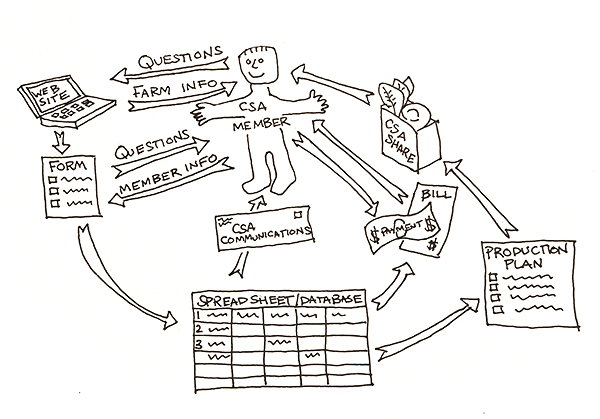 There are a lot of pieces in a complete system for managing CSA members but if you address them one piece at a time it doesn’t need to be overwhelming. Illustration courtesy of the author.
The form is set up to collect the information I need quickly and concisely. With Forms you can have required questions and questions that are optional. For my farm most questions are mandatory because I have to know them, but I also include a few optional questions, including one at the end which just lets people say anything they didn’t get a chance to anywhere else. Often times folks just say how excited they are to take part, not essential information for me, but it sure is nice to hear and I think folks like having a place to say that.
Questions can come in several types: short answer, long answer, multiple choice, checkboxes, etc. Wherever possible I use multiple choice and checkboxes. This both makes it faster for folks to fill it out and standardizes how they answer, making it easier for me to sort the answers once I have them. I ask folks for their contact information, which options they want, and how they want to pay for those options. I also ask them to confirm that they’ve read all of the information on what it is that they’re signing up to be a part of (our Member Agreement).
Invoicing and payments
Invoicing and receiving payments happen independently from the sign-up process in my system. I use Quickbooks desktop for Mac for creating invoices, but there are lots of other ways to create and track invoices, including just keeping track in the spreadsheet. I accept payments through Paypal, which allows people to pay by credit card or with their Paypal account. To bill people through quickbooks I use their invoicing tool and create a duplicate of the invoice from Quickbooks. This is redundant, but it allows me to track all CSA payments in the place where I do my primary bookkeeping, Quickbooks. I also accept checks and cash. The payment processing options continue to expand and I haven’t seen one that’s clearly better than others – it appears to me that there’s an initial learning curve with any of them and ultimately the fees are fairly similar so picking one and sticking with it is the most efficient thing to do.
Member data
Conveniently, the Google Form will export all of the answers into a Google Sheet where they are easier for me to manipulate. It will also send me an email every time someone signs up if I want it to – although I prefer just to check the results at least once a week. For redundancy I like to copy the information from the Google Sheet into an Excel workbook which I’ve set up for pulling the information out that I need and where I can work on it offline. If the Excel sheet ever gets corrupted I can always go back to the original data in the Google Sheet – or the other way around.
There are a few different things I want to be able to do with the data once it’s in my Excel workbook. When someone signs up in this system I still haven’t invoiced them. The first thing I do is add a few extra columns to the sheet with the raw data and in those columns I note the date when I create their invoice and when I receive their payments.
In the Excel spreadsheet I also create columns to keep a records of things like when I’ve emailed CSA members information, access to our online recipe database for example (we give our CSA members access to cookwithwhatyouhave.com with their shares). If someone tries to sign up after all of our spots are full I have columns to indicate that they are on the waiting list. Google Forms fills the first column of the sheet with a timestamp of when the form was submitted so it’s easy to trace when people signed up.
I have a separate sheet in my Excel workbook that references the data in the first sheet and calculates how many people have signed up for each individual season and pick up day. To do this I use “If” formulas to look at what each member has signed up for and to only count them if they’ve signed up for a particular season and day. This helps me keep track of how many shares I still have left to sell, or how many people are on the waiting list for a particular season.
Member communications
On the Excel sheet with the invoicing information I use “filters” which then lets me look at the contact information for people in a particular season on a particular day (you could also do this by sorting and just looking at the group of rows you want). I can then copy that information and import it into our Mailchimp account and add a tag there to indicate the season and pickup day they are signed up for. That allows me to send out bulk emails to my CSA members for a particular season and on a particular day.
Turning orders into CSA shares
For week by week tracking we use paper check sheets. To make these I simply copy the list of members for a pick-up day onto a blank sheet of the Excel workbook and then make columns with date headers at the top. I can typically fit about 7 weeks of check box columns on a sheet, and about 40 CSA members. On harvest mornings I’m using the check sheet to remind myself of how many members we’re harvesting for that day. During pick-up we use the sheet to keep track of who has already gotten their share that day.
We allow CSA members to switch their pick-up day if needed, and to do that they simply need to email me at least 24 hours in advance. When a CSA member does that I set a reminder on my phone for the morning of the CSA harvest that they need to be switched, and when I get the reminder that morning I make a note on the check sheet for the box next to their name in the proper date column.
Other CSA management systems
In addition to the Forms/Sheets system I’m describing here, I’ve also used/tried some of the more purpose-built web based CSA management systems. In general, and specifically with these systems, when you use a purpose-built system it has the advantage of already being systematized so it will walk you through a predetermined system rather than having you create one yourself. Because it is predetermined, and is trying to meet the needs of many different CSAs, it almost always has a few features that I don’t really need for my particular farm, and is often lacking a few I wish it did have. Often, with the ones it’s lacking, it’s not so much that it can’t do what I want it to, and more that it does it in a different way than I would have thought natural – and that creates a bit of mental adjustment period while I get comfortable with how it works.
In general I have not found that the purpose-built systems save me time overall – but they do reduce the number of steps it takes for my CSA members to sign up since they can essentially just purchase the share as they would any item in an online store. My Google Forms system forces people to sign up in one step and then pay the invoice in a separate step once I’ve confirmed I have a share for them. I allow people to use payment plans when they need to and a good purpose-built system automates those payments, making life simpler for the CSA member, and reducing the number of forgotten payments I need to track down.
These systems not only make payment simpler for the CSA member, but they often provide a place for the CSA members to make pick-up day switches, or to customize the contents of their shares if the farm allows. If you’re a farm that is trying to offer a lot of flexibility week to week, having a system for getting those customizations into timely pick and pack lists is important.
I haven’t provided much of the details on the Excel functions and features I use but I’ve named them and if you’re not familiar with one there’s tons of good information that’s an easy web search away online. Dan Brisebois has some great training resources at The Farmer Spreadsheet Academy, and if you need specific help there are lots of folks out there, such as myself, who offer one-on-one assistance in setting up spreadsheets.
For the past year I’ve been using GrownBy.app, largely out of curiosity, and one of the aspects I like best about it is that it’s formed as a farmers’ cooperative. In the spirit of cooperation, it’s specifically designed with collaboration between CSA farms in mind, forcing all of the participating farms to sell on the same platform, but allowing CSA members to use a single account to purchase shares from multiple CSA farms who offer different (or even the same) items. See the article on the facing page for more about GrownBy.
CSAware and Farmigo were two of the early purpose-built CSA management packages and they each have their own personalities and list of features they have settled on over the years. At this point there are many options out there if you’re not wanting to create your own system and you’d rather have someone else structure it for you.
It’s important to remember that in setting up any system for your own farm it’s not just the tools, but the way the tools are used within a larger system that makes the difference. Spreadsheets are one tool, purpose-built web applications are a different tool, they both have a learning curve and a set of capabilities and limitations. They both need to fit into a larger system, and that system is influenced by the capabilities and limitations of the tool you choose to use.
Josh Volk farms in Portland, Oregon, and does consulting and education under the name Slow Hand Farm. He is the author of the books Compact Farms: 15 Proven Plans for Market Farms on 5 Acres or Less, and Build Your Own Farm Tools, Equipment & Systems for the Small-Scale Farm & Market Garden, both available from Growing for Market. He can be found at SlowHandFarm.com.
Copyright Growing For Market Magazine.
All rights reserved. No portion of this article may be copied
in any manner for use other than by the subscriber without
permission from the publisher.